A note about the future of ecsoft2.org

ecsoft2.org runs on software (Drupal 7 and PHP 7.4) that reached its end of life years ago and no longer receives security updates. Keeping the site online safely is getting harder.

Giving it a future means migrating it to a current platform — and that is only worth doing if people still use it and want to help keep it alive.

If you care about ecsoft2.org, as a user, a contributor, or someone willing to lend a hand, please ggambaattiscali [dot] it (get in touch) by January 31, 2027.

If no one comes forward by then, the site will be turned into a read-only archive, so that its content stays available.

sqlMate

Version: 
1.3
Release date: 
Wednesday, 11 May, 2011

License:

Interface:

Authors/Port authors:

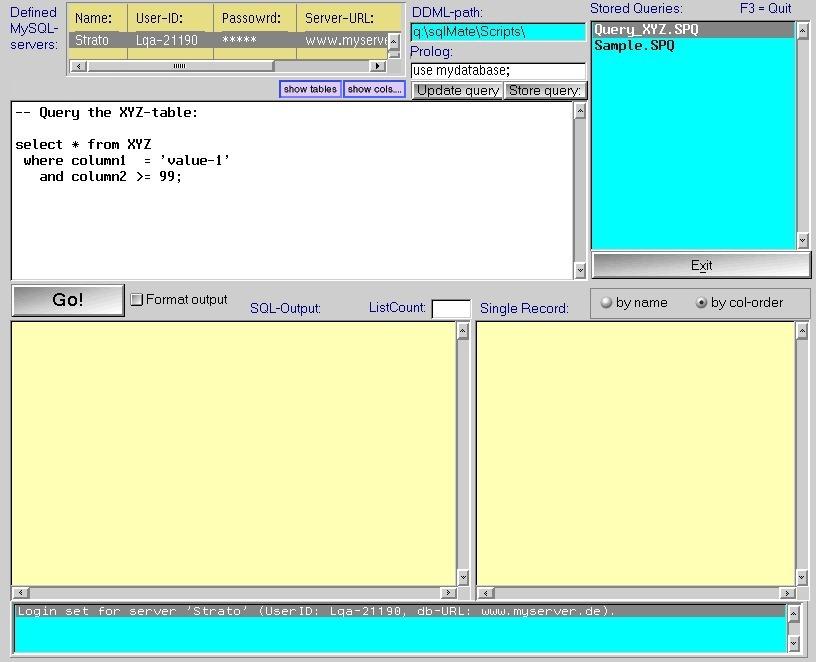
sqlMate makes working with a remote MySQL-database much more easy.

As an administrator you perform tasks such as:

  • Create tables, modify and delete tables
  • Display row-data, sometimes modify them
  • Create indexes, modify and delete them
  • Start queries
  • and many more.


This software is distributed as compressed package. You have to download and manually install it; if prerequisites are required, you will have to manually install them too.

Manual installation

Program is distributed as ZIP package: download to temporary directory and unpack to destination folder. Run install.cmd. See below for download link(s).

Online documentation:

Following ones are the download links for manual installation:

sqlMate v. 1.3 (11/5/2011, Lutz Wagner) Readme/What's new
History-Function: Whenever a SQL-command is executed (by means of the 'Go'-button) the command is saved internally. To recall any SQL-command which has been executed before you simply click on the History-button and you can select from a list of already processed commands. Note: The history-buffer is only valid during program-lifetime, i.e. after sqlMate has terminated the history vanishes also. So the History-function does not mean that you don't have to save your SQL-command finally before exiting the program.
 www.zworks.de/Download.php4?what=os2/sqlMate/sqlMate&Lang=E
Record updated last time on: 13/04/2018 - 10:24

Translate to...

Add new comment