Classi CW-Multimedia

Versione: 
0.3.1.0
Data rilascio: 
Domenica, 14 Luglio, 2002

Licenza:

Interfaccia:

Authors/Port authors:

Questo pacchetto rimpiazza completamente le vecchie classi multimedia di OS/2 Warp 4.x con classi più robuste e con caratteristiche avanzate. Inoltre la nuova procedura IO JPEG finalmente elimina le pesanti limitazioni di OS/2 con le immagini JPEG. Caratteristiche:

  • file MP3 e OGG integrati nella WPS;
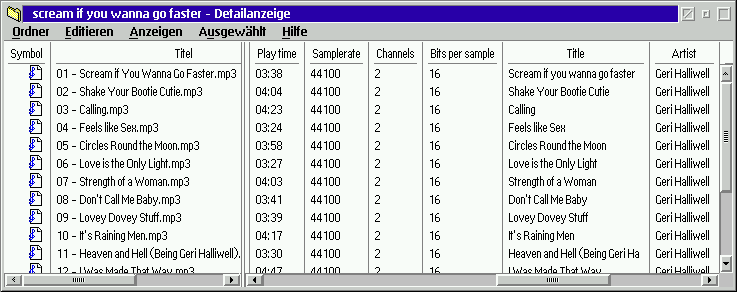
  • dettagli audio per ogni classe in visualizzazione dettagli delle cartelle;
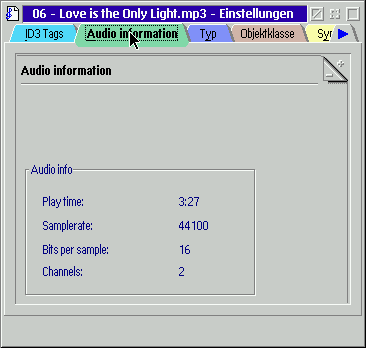
  • dettagli audio per ogni classe nelle proprietà;
  • tag ID3 nella visualizzazione dettagli delle cartelle;
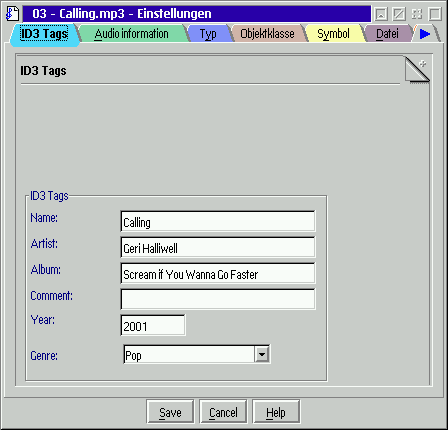
  • tag ID3 nelle proprietà;
  • cache delle informazioni per velocizzare l'apertura delle cartelle;
  • informazioni delle immagini nelle proprietà e nella visualizzazione dettagli;
  • nuova JPEG-IO proc. inclusa;
  • il media folder permette di ascoltare qualsiasi file audio;
  • nuova classe shadow che visualizza le info audio (visualizzazione dettagli);
  • playlist (il contenuto della cartella è la playlist);
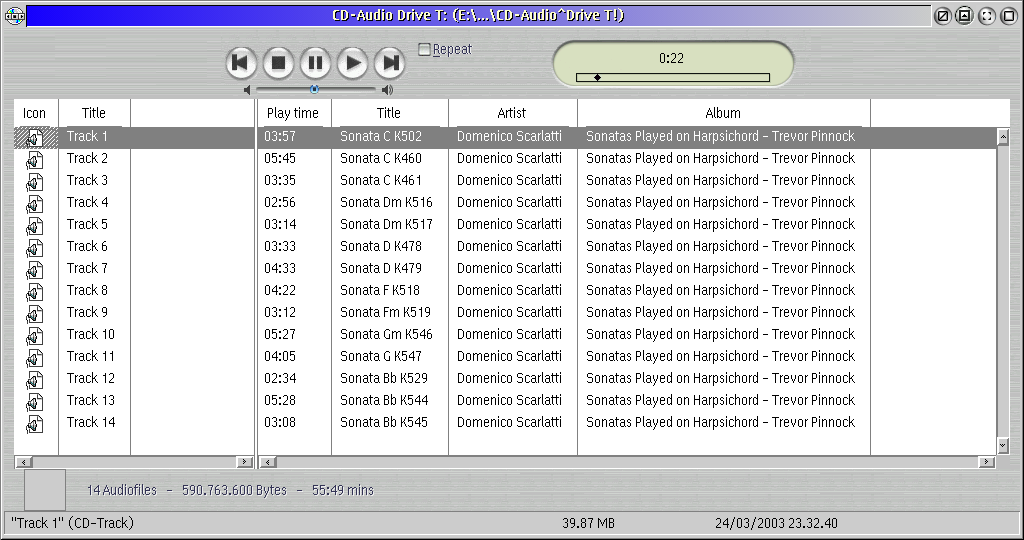
  • CD player con supporto FreeDB;
  • controllo tramite stringhe di setup;
  • condivisione del dispositivo sonoro;
  • tag ID3 visualizzati nel lettore;
  • interfaccia REXX se installato WPS Wizard;
  • oggetto stream audio per ascoltare dai server IceCast.
Questo software è distribuito come pacchetto compresso, da scaricare e installare manualmente; se ci sono prerequisiti da soddisfare, andranno anch'essi scaricati e installati manualmente.

Installazione manuale

Seguire scrupolosamente le istruzioni:

  • Installare le classi mmedia MMAudio Pak;
  • fare una copia dei file JPEGIO.DLL e MMPARTS.DLL in MMOS2\DLL e dei file INI di sistema;
  • disinstallare con l'apposito programma eventuali vecchie versioni di Media folder e classi CWAudio. Riavviare il sistema;
  • verificare i file INI con Checkini;
  • scompattare il file zip in una cartella temporanea e lanciare Runme1st.cmd;IAVVIARE LA WPS!
  • ricontrollare i file INI con Checkini e/o un altro programma;
  • RIAVVIARE ANCORA LA WPS!
  • lanciare install.exe, che registrerà le nuove classi;

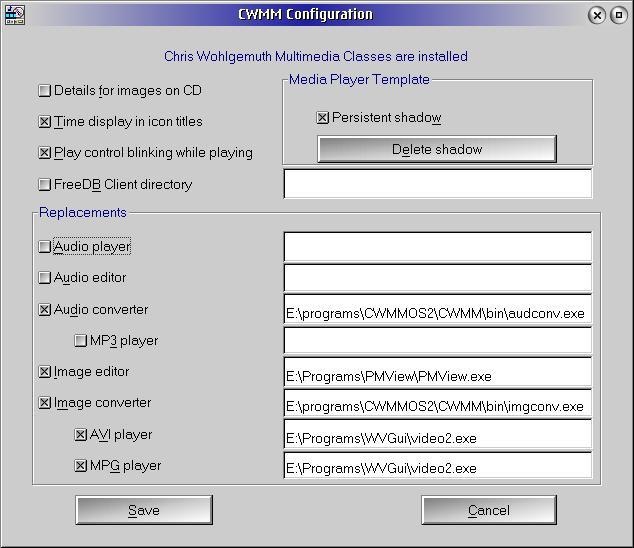
Modificando il file OS2.INI con questa piccola utility realizzata da Salvador Camacho si possono cambiare tutti i player assunti del sistema! Si veda il capitolo "Hidden features" nel file INF principale (in inglese).

NOTA BENE: queste classi multimedia convivono perfettamente con XWorkplace. WPS-Wizard è opzionale. Se si riscontrano dei problemi, probabilmente non si è correttamente eseguita l'installazione.

I link seguenti sono a programmi aggiuntivi, utili ma non indispensabili per il funzionamento:

Qui di seguito trovi i link di download per l'installazione manuale del software:

Classi CW-Multimedia v. 0.3.1.0 (31/1/2026, Gregg Young) Readme/What's new
0.3.1.0 - Add help button to convert dialogs - Make target name different from source name when convert is asked to "convert" to the same format as the source. - Fix audio player and mmfind so they play MIDI files if TimidityMCD is installed - "Keys" help now displays the CWMM keys help instead of the WPS keys help - Remove copy create shadow and move from popup menus in folder where they don't work
 www.hobbesarchive.com/Hobbes/pub/os2/apps/mmedia/util/CWMM-0-3-1-0.wpi  local copy
Classi CW-Multimedia v. 0.2.8 (German, 2/11/2004, Chris Wohlgemuth) Readme/What's new
CW-Multimedia classes V0.2.8 (C) Chris Wohlgemuth 2001-2004 http://www.geocities.com/SiliconValley/Sector/5785/ http://www.os2world.com/cdwriting Replacement multimedia classes for the ones coming with MMOS2. These new classes are more robust and have additional features. Additional WPS classes for seamless integration of MP3, OGG and FLAC files into the WPS. Standard WPS audio menues like any other audio file. Information page in the settings notebook about audio characteristics. ID3 (V1.1) page for MP3 files for viewing and setting. Audio and ID3 information shown in details view. The classes were known as CW-audio-classes. Media-Folder class to play any known audio file. Use it as your favorite MP3-player. CD player with FreeDB support. Playlinst editor for *.m3u files. PNG image class. New JPG IO-procedure for reading progressive JPG images. Slide show program for displaying the contents of one ore more directories. Requires: OS/2 Warp 4 or eCS, MMOS2 and EMX runtime 09d fix4 cw-mmclasses-0_2_8-ger.zip - german version Licence: This package is provided 'as is' for free. See license.txt.
 hobbes.nmsu.edu/download/pub/os2/apps/mmedia/cw-mmclasses-0_2_8-ger.zip  local copy
Classi CW-Multimedia v. 0.2.7 (English, 6/9/2003, Chris Wohlgemuth) Readme/What's new
1. CW-multimedia classes ------------------------ This package is a complete replacement for the multimedia classes coming with MMOS2. The convert menu is enhanced and the image classes are more robust WRT broken image files or buggy IO-procs. The limitations of the JPG-IO proc are still there. This procedure crashes on some images and the only way to resolve is a restart of the WPS. To overcome this limitiation a new JPGIO-IO procedure is included. New classes are for seemless integration of the MMIO procedures for MP3 and OGG files written by Russel O'Connor. Get these procedures from: http://www.math.berkeley.edu/~roconnor/ After installation Ogg- and MP3 files are treated the same way by the WPS as the other audio files. They have their own Icons and the same menus as for example wave files. A doubleclick starts playback another one stops it. The convert menu item helps you decoding the file to wave without any other program. The settings notebook of every audio file gets a new page added describing the audio characteristics like playtime or samplerate. This data is also shown in the details view of folders if set to class:CWAudio. There's also a new open-item for volume. You may view and change the ID3 tags of MP3 files using the settings notebook. These tags are also shown in the details view. A new JPEG IO procedure supports progressive JPEG images. 2. Media folder and audio shadow -------------------------------- The Media folder is a player for any audio file known by OS/2. The usual play controls are available and you may create playlists just by dropping files into the folder. Audio files will not be put into the folder directly but shadows are created. A new shadow class shows you details information for the linked audio files in the details view of a Media-Folder. A REXX interface is available if WPS-wizard V0.2.0 or above is installed. A WPS enabled CD player with FreeDB support is included and a *.M3U playlist editor. Installation ------------ Before you ask: YES THE MULTIMEDIA CLASSES WORK WITH XWP. DON'T BOTHER ME WITH QUESTIONS ABOUT THAT. !!!!!!!!!!!!!!!!!!!!!!!!!!!!!!!!!!!!!!!!!!!!!!!!!!!!!!!!!!! MAKE A BACKUP OF YOUR INI FILES! MAKE A BACKUP OF YOUR INI FILES! MAKE A BACKUP OF YOUR INI FILES! !!!!!!!!!!!!!!!!!!!!!!!!!!!!!!!!!!!!!!!!!!!!!!!!!!!!!!!!!!! Note: If you've installed WordPerfect for OS/2 5.2(a) uninstall it first. Otherwise it'll be impossible to deregister the IBM multimedia classes and your system will most likely crash during install of the new classes. Be sure to clean the INI file using 'checkini /C' before you proceed. Make a copy of JPEGIO.DLL and MMPARTS.DLL in the directory MMOS2\DLL. These files will be overwritten during installation of the new multimedia classes. The install skript will create additional copies of the DLLs in the directory MMOS2\CWMMBack for reinstallation of the IBM classes Deinstall any old version of the media folder and the CWAudio classes. Restart the system. 1. Put the contents of the archive into a directory 2. Start the Skript Runme1st.cmd 3. Restart the WPS. DON'T SKIP THIS STEP! 4. Clean the INI files with 'Checkini.exe /C' (wptool32.zip, http://hobbes.nmsu.edu) 5. Restart the WPS. DON'T SKIP THIS STEP! 6. Run install.exe.This will copy the files and register the new classes. 7. Restart the WPS so the new classes will be loaded. If the WPS doesn't start rename the installation directory from a command line. It may be helpful to move all objects from the desktop when start problems occur. Be sure to use the latest release of the MMIOMP3 IO-procedure (http://www.math.berkeley.edu/~roconnor/). It has a lot of improvements. Uninstallation -------------- 1. Use the uninstall feature of the generic installer 2. Restart the WPS. DON'T SKIP THIS STEP! 3. Clean the INI files with 'Checkini.exe /C' (wptool32.zip, http://hobbes.nmsu.edu) 4. Run the script x:\MMOS2\CWMMBack\INSTIBM.CMD to install the IBM classes. Replace x with your boot drive. Restart the WPS afterwards. Known problems -------------- The playtime may be not correct for some VBR-MP3s. This is a problem of the MMIOMP3-Proc not the classes. MP3 files may not be recognized correctly. This happens if there was a previous installation of the classes. Drop the folder containing the MP3 files on the skript \cwmm-x_x_x-lang\bin\RemoveEA.CMD to remove the attribute .CLASSINFO and to set the right .TYPE attribute. The folder must be closed when dropping! Wave and ogg files loose the track information entered in the settings so be sure to backup this information before using the skript. The audio stream class only supports IceCast servers. There's no support for Shoutcast. Bug reporting ------------ Use the 'Multimedia Extensions' section of http://xtracker.netlabs.org if you find a bug. Helpful utility ------------ Salvador Parra Camacho has written a program to change the hidden settings (see documentation) in a convenient way. Find the homepage at: http://www.geocities.com/escajarro/ Direct download of the utility: http://www.geocities.com/escajarro/soft/ccfg010z.zip (Zip) http://www.geocities.com/escajarro/soft/ccfg010w.zip (Wpi) History ------- V0.1.0 First release of the new audio classes. V0.2.0 -Type 'Digital Audio' returned in addition to MP3/OGGS for the audio classes. -Setting of .TYPE EA so Digital Audio player works with MP3/OGG files without further fiddling -Caching of MP3 technical data in EAs to speed up folder opening. -ID3 data shown with the right codepage. -Mnemonic for Volume menu item. -New classes CWMediaFolder and CWAudioShadow for playing of audio files. V0.2.1 MMClasses: -A bunch of minor fixes. -No prereading of audio info for files on CD to speed up folder opening. Media folder: -Repeat function added -new (and improved) sliders -Keyboard control added (not for sliders yet) -Display for elapsed time, remaining time and ID3 tags (click to switch) -Change playtime font by DnD -Drag and drop handling rewritten. -Statusline added -REXX interface added -No audio info reading for files on CD to speed up CD opening. V0.2.2 MMClasses: -New CD track class for FreeDB enabled CD player -Improved open function. See media folder documentation Media folder: -CD player object with FreeDB support added. -Some minor fixes. V0.2.3 (13.07.2002) MMClasses: -Added new replacement classes for audio, video and image files. The MMOS2 classes are not used anymore. -Improved lighttable folder with selectable icon size. Media folder: -Added new replacement classes for audio, video and image files. The MMOS2 classes are not used anymore. -Improved lighttable folder with selectable icon size. V0.2.4 (29.11.2002) Media folder: -Fixed PM-freeze with broken shadows. -Fixed problems when user deleted shadows during playing. -Repeat function was broken. -Device sharing didn't really work. -Random play added. -Launch area for objects. -Settings opening was only possible with closed folders -Audio files are started on a separate thread. -Media folder will take over already playing files (very limited for now, only skip/stop). -CD-folder works for all drives not only default cd drive. MMClasses: -Added some more exception handlers. -Image details aren't read from CD unless key in INI file is set (see docs). -Titlebar of volume control may be hidden -Tabbing in volume control enabled -Save colors and position of volume control, audio- and image converter -Query audio information on a separate thread when awakening objects (speed boost for MP3) -Print menu removed for audio and video files. -Improved ID3 handling. ID3 V1.1 tracknumber is kept if present. -Elapsed time in icon titles when playing. -Changed names for classes to improve compatibility with the IBM classes. -Unified setup strings for MP3 and other audio files. -Lighttable folders: sometimes drawing of icons failed. V0.2.5 (16.02.2003) Media folder: -Popup menu on time control for changing display -New playlist editor -Shadows for fly over help MMClasses: -DLLs needed by specified players or editors weren't found if not in LIBPATH. -You may specify a different mp3 player -Fixed wrong icon size for standard classes in details view of light table folders. -Added support for animated folder icons in lightable folder -Templates were not drawn in light table folders icon view -Pause function for audio files -Fixed asscociations for image files. -Fixed image conversion. -Renamed REXX functions. The old names are still working but shouldn't be used longer. -Added new REXX function cwmmQueryImageInfo() -Added method cwmmQueryImageInfo(). -ID3 tags of MP3 files weren't set when using setup strings. Only EAs were updated. -No more garbled characters with some players when reading the ID3 tags. -Black and white images are properly drawn in light table folder JPEG IO procedure: -Procedure now accepts 8 bit input images. V0.2.6 (02.07.2003) -Audio extensions added in the MM configuration notebook are recognized. -createcd compiled with VAC -helper progs statically linked. -No template for CWMMDataFile. -New FLAC class. -New EA MMNUMAUDIOBYTES containing the number of audio bytes of the file. -M3U playlist editor failed using M3U lists created by Rockbox. -Play menu for M3U objects. -Hilighting of play and pause buttons during device sharing corrected -You can't start more than 3 audio files at a time now, preventing problems when a whole folder of audio objects was accidently selected. -Support for converting to OGG-Vorbis. Any future write enabled audio IO-Proc will be automatically supported now. -Default audio player replaced -Opening of folders with image files is faster now -Image spacing in lighttable folders improved -Image converter dialog had german resources in the english language version (obviously nobody cared...). -Preview in image converter -PNG image class -PNG files are recognized as image files. Automatic support of future image IO procs. -Only one INI file for MM class helpers. V0.2.7 (01.09.2003) -Renamed method cwmmAddWaveInformationPage() to cwmmAddAudioInformationPage(). -Added container handle to parameter list of methods cwmmPlayTrack() and cwmmPauseTrack() -If several audio files in a folder are started at once they will be played consecutively. -Image information in popup menu -Added audio information for midi files in details view. -Audioplayer playback always started with default volume setting (70%). -Master volume item added to sys menu of audio player. -Language now derived from LANG setting not the country code. -URL of audio stream objects was truncated to 4 chars when reopening the settings. -Audio-Stream objects lost their type after changing settings. -Bitrate display for MP3 files if MMIOMP3 0.4.2 or above is installed. -Bitrate display for OGG files if MMIOOGG 0.3.1 or above is installed. -ID3 tag handling completely rewritten. Track information may be 256 bytes long per entry. ID3 tags are handled separately now. -Volume for audio files adjustable now. Volume menu no longer starts master volume. -Modified settings page handling for audio objects on CD -Added INI key to disable audio file scanning for certain drives. -Added INI key to disable ID3 tag reading for certain drives. V0.2.7b (06.09.2003) -Skript creatobj.cmd for creation of CD players was broken. Credits ------- The Icons and graphics are (C) Klaus Staedtler-Przyborski. Thanks for fearless beta testing. The script for creation of a media folder tree is (c) Eirik Oeverby. License -------- Theses classes are free to use but copyrighted. Use them on your own risk. If they burn your house or destroy your data it's all your fault. Author ------ These classes are (C) 2001-2003 Chris Wohlgemuth. http://www.geocities.com/SiliconValley/Sector/5785/ http://www.os2world.com/cdwriting
 hobbes.nmsu.edu/download/pub/os2/apps/mmedia/cw-mmclasses-0_2_7b-eng.zip  local copy
Scheda aggiornata l'ultima volta il: 04/02/2026 - 06:14

Aggiungi un commento