ecsoft2 is moving to a new platform!

Thanks to everyone who answered our call: the site will be upgraded and will stay online, with all its content and user accounts. Over the coming months you may notice some changes. If you’ve already written to us, we’ll be in touch once the new site is ready. If you’d like to help keep the catalog up to date, ggambaattiscali [dot] it (get in touch)!


USB Configuration Notebook

Versione: 
0.82
Data rilascio: 
Domenica, 4 Maggio, 2014

Categorie:

Licenza:

Interfaccia:

Authors/Port authors:

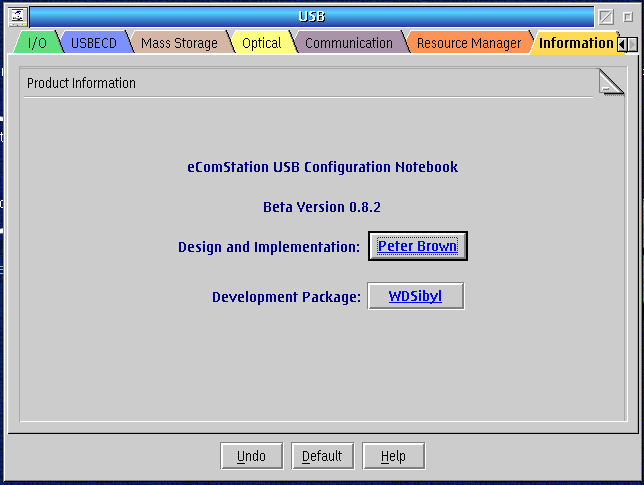
USB Configuration è un notebook concepito per configurare la maggior parte delle impostazioni USB. Questa applicazione non è compatibile con il driver alternativo CW USB.

Può essere usato per aggiungere linee di controllo al config.sys consentendo all'utente di aggiungere Controller Host USB al sistema. Non è studiato per l' installazione iniziale di un driver ma può essere usato per configurare i drivers USB ancora non attivi che sono disponibili in X:\OS2\BOOT.

Questo software è distribuito come pacchetto compresso, da scaricare e installare manualmente; se ci sono prerequisiti da soddisfare, andranno anch'essi scaricati e installati manualmente.

Installazione manuale

Disponibile sia in formato ZIP che WarpIN:

  • scaricare il pacchetto ZIP in una cartella temporanea, scompattarlo nella cartella di destinazione ed eseguire install.cmd;
  • il pacchetto WarpIN è autoinstallante.

Vedi sotto per il(i) link di download.

Qui di seguito trovi i link di download per l'installazione manuale del software:

USB Configuration Notebook v. 0.82 (WarpIN, 9/9/2014, Peter Brown) Readme/What's new
Beta 0.8.2 Changed USBECD popup menu item Delete Line to Remove Line "Synchronised" keyboard shortcuts for the USBECD popup menu items with the state of those items ie Enabled = Keys work or Disabled = nothing happens Changed code to allow USBECD lines without leading 0's to be valid eg DEVICE=H:\OS2\BOOT\USBECD.SYS /D:3:0000:1 /N:AA$ is the same as DEVICE=H:\OS2\BOOT\USBECD.SYS /D:0003:0000:0001 /N:AA$ Added the parameter /bin to the call to USBDock.exe Increased size of Revision text area to avoid truncation of Revision data Corrected System, Page1 EHCI showing as USB v1; now shows as USB v2 Allow Printer Device Name to be LPT Updated Help file with changes and corrected some "typos" Available in ZIP and Warpin packages.
 hobbes.nmsu.edu/download/pub/os2/system/USBcfg082.wpi
USB Configuration Notebook v. 0.82 (zip, 9/9/2014, Peter Brown) Readme/What's new
Beta 0.8.2 Changed USBECD popup menu item Delete Line to Remove Line "Synchronised" keyboard shortcuts for the USBECD popup menu items with the state of those items ie Enabled = Keys work or Disabled = nothing happens Changed code to allow USBECD lines without leading 0's to be valid eg DEVICE=H:\OS2\BOOT\USBECD.SYS /D:3:0000:1 /N:AA$ is the same as DEVICE=H:\OS2\BOOT\USBECD.SYS /D:0003:0000:0001 /N:AA$ Added the parameter /bin to the call to USBDock.exe Increased size of Revision text area to avoid truncation of Revision data Corrected System, Page1 EHCI showing as USB v1; now shows as USB v2 Allow Printer Device Name to be LPT Updated Help file with changes and corrected some "typos" Available in ZIP and Warpin packages.
 hobbes.nmsu.edu/download/pub/os2/system/USBcfg082.zip
USB Configuration Notebook v. 0.82 (zip, 9/9/2014, Peter Brown) Readme/What's new
Beta 0.8.2 Changed USBECD popup menu item Delete Line to Remove Line "Synchronised" keyboard shortcuts for the USBECD popup menu items with the state of those items ie Enabled = Keys work or Disabled = nothing happens Changed code to allow USBECD lines without leading 0's to be valid eg DEVICE=H:\OS2\BOOT\USBECD.SYS /D:3:0000:1 /N:AA$ is the same as DEVICE=H:\OS2\BOOT\USBECD.SYS /D:0003:0000:0001 /N:AA$ Added the parameter /bin to the call to USBDock.exe Increased size of Revision text area to avoid truncation of Revision data Corrected System, Page1 EHCI showing as USB v1; now shows as USB v2 Allow Printer Device Name to be LPT Updated Help file with changes and corrected some "typos" Available in ZIP and Warpin packages.
 hobbes.nmsu.edu/download/pub/os2/util/config/USBcfg_0-8-2.zip
Scheda aggiornata l'ultima volta il: 24/06/2023 - 21:23

Commenti

New Link: https://hobbes.nmsu.edu/download/pub/os2/util/config/USBcfg_0-8-2.zip

Aggiungi un commento