 English
 Italiano
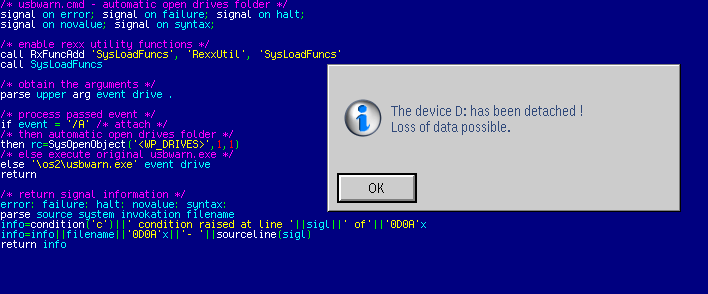
Il programma USBWARN.EXE apre automaticamente la cartella dei dischi di sistema dopo l'inserimento di un drive usb rimovibile, rendendo così subito disponibili i contenuti. Il programma avvisa con finestre di dialogo appropriate sull'uso corretto del software o la rimozione accidentale dell' hardware.
A note about the future of ecsoft2.org
ecsoft2.org runs on software (Drupal 7 and PHP 7.4) that reached its end of life years ago and no longer receives security updates. Keeping the site online safely is getting harder.
Giving it a future means migrating it to a current platform — and that is only worth doing if people still use it and want to help keep it alive.
If you care about ecsoft2.org, as a user, a contributor, or someone willing to lend a hand, please ggamba tiscali [dot] it (get in touch) by January 31, 2027.
If no one comes forward by then, the site will be turned into a read-only archive, so that its content stays available.
Open USB Stick
Versione:
06082012
Data rilascio:
Lunedì, 6 Agosto, 2012
Categorie:
Licenza:
- Freeware
Interfaccia:
- PMShell
- Workplace Shell
- Finestra comandi
Installazione manuale
Program is distributed as ZIP package: download to temporary directory and unpack to destination folder. See below for download link(s).
Qui di seguito trovi i link di download per l'installazione manuale del software:
| Open USB Stick v. 06082012 (6/8/2012, Wim Brul) | Readme/What's new |
Opens the drives folder automatically after insertion of the usb stick.
Description - The program USBWARN.EXE executes the accompanying USBWARN.CMD
file automatically upon insertion of a usb stick into your system.
Installation - Move USBWARN.ZIP into a directory of your choice and unzip it.
Copy USBWARN.EXE and USBWARN.CMD to the root directory of your system.
May be freely used and exchanged, as long as it is not modified. |
 home.hccnet.nl/w.m.brul/usbstick/usbwarn.zip home.hccnet.nl/w.m.brul/usbstick/usbwarn.zip |
||
| Open USB Stick v. 06082012 (6/8/2012, Wim Brul) | Readme/What's new |
Opens the drives folder automatically after insertion of the usb stick.
Description - The program USBWARN.EXE executes the accompanying USBWARN.CMD
file automatically upon insertion of a usb stick into your system.
Installation - Move USBWARN.ZIP into a directory of your choice and unzip it.
Copy USBWARN.EXE and USBWARN.CMD to the root directory of your system.
May be freely used and exchanged, as long as it is not modified. |
|
hobbes.nmsu.edu/download/pub/os2/util/system/USBWarn_2012-08-06.zip |
Scheda aggiornata l'ultima volta il: 16/07/2023 - 17:31

This work is licensed under a Creative Commons Attribution 4.0 International License.
Scrivici! (tramite il form web o per ecsoft2 [dot] orggmail [dot] com (email))
Commenti
Martin Iturbide
Dom, 16/07/2023 - 16:41
Collegamento permanente
New LInk: https://hobbes.nmsu
Aggiungi un commento