 English
 Italiano
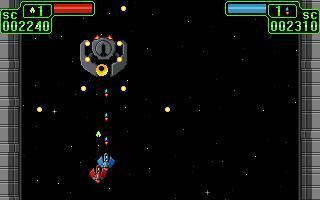
Gioco spara tutto nel classico stile arcade.
A note about the future of ecsoft2.org
ecsoft2.org runs on software (Drupal 7 and PHP 7.4) that reached its end of life years ago and no longer receives security updates. Keeping the site online safely is getting harder.
Giving it a future means migrating it to a current platform — and that is only worth doing if people still use it and want to help keep it alive.
If you care about ecsoft2.org, as a user, a contributor, or someone willing to lend a hand, please ggamba tiscali [dot] it (get in touch) by January 31, 2027.
If no one comes forward by then, the site will be turned into a read-only archive, so that its content stays available.
Dodgin' Diamond II
Versione:
0.2.2
Data rilascio:
Domenica, 19 Dicembre, 2010
Categorie:
Licenza:
- GPL
Interfaccia:
- PMShell
- Workplace Shell
Installazione manuale
Il programma è distribuito come pacchetto ZIP: scaricare in una cartella temporanea e scompattare nella cartella di destinazione. Vedi sotto per il(i) link di download.
Qui di seguito trovi i link di download per l'installazione manuale del software:
| Dodgin' Diamond II v. 0.2.2 (Release 2, 20/8/2026, Martin Iturbide) | Readme/What's new |
This is Dodgin' Diamond II
With sound & music where available.
** Required **
DD2 needs SDL 1.2.x and SDL_Mixer.
You can find both needed libraries at http://www.libsdl.org/
You can get newest version of this package at:
http://www.usebox.net/jjm/dd2/
** Install **
UNIX Instructions
In the root directory of DD2 package:
$ ./configure
$ make
$ su
$ make install
$ exit
$ dd2
You may read the generic INSTALL file.
Win32 Instructions
The game doesn't need any installation. Just unzip the
package and run dd2.exe. In case of error (eg. the game
doesn't start), check stderr.txt file in dd2.exe directory.
** Configuration **
You can change player control, sound and graphic mode in
the configuration screen of the game.
By now you must restart DD2 in order to activate graphic
configuration changes.
** Keyboard **
Player 1: UP, DOWN, LEFT, RIGHT, RIGHT CONTROL
Player 2: w, s, a, d, LEFT CONTROL
There are reports of systems with just one control key. In those
systems you should use 'm' key instead RIGHT CONTROL. To enable
this alternative fire key, configure with:
$ ./configure --enable-alternate-fire-key
** Joystick **
Player 1: Joystick 1 (if available)
Player 2: Joystick 2 (if available)
Use the pad to move, first button to fire and second button to
pause/resume the game.
In the menu, use up/down, first button to select, and second
button to exit.
In the hiscore entry, use up/down to select letters, right to
enter, second button to delete and first button to finish.
** Troubleshooting **
Some common issues:
1. Your computer is very old (slow) and the game doesn't
run properly (Win32/X11).
You can try changing sound quality in the configuration
screen. Better sound requires a faster computer.
2. You graphic card doesn't support SDL's 320x200 8bpp full
screen mode properly (Win32).
That's not frequent, but may happen. You can set 'windowed'
graphic mode in the configuration screeen. Setup Windows
resolution to 640x480 and it will be playable in a window.
3. You cannot run DD2 in full screen mode (X11).
SDL's full screen mode it's only supported under Win32. If
you run it in full screen mode probably it will change your
display to the closest screen mode available (if you don't
have 320x200 in your mode list). If you wanna play it 320x200
full screen, add this mode to your X11 configuration.
Check the FAQ about using SDL: http://www.libsdl.org/faq.php.
4. The sound doesn't work; or the sound works bad and/or
the programs does 'Segmentation Fault' at exit (UNIX).
This may be due you're running an audio daemon (esd, artsd)
and SDL tries OSS API with /dev/dsp by default.
You can use SDL_AUDIODRIVER environment variable to set the
name of the driver you wanna use. The drivers available depend
on your SDL installation.
In order to use esd driver, execute in a bash alike shell:
SDL_AUDIODRIVER="esd" dd2
Check the FAQ about using SDL: http://www.libsdl.org/faq.php.
5. My joystick/gamepad doesn't respond correctly (UNIX/Win32).
You must calibrate your device. Under UNIX systems you
should use jscal (If available). Under Win32 you should
follow vendor instructions.
6. When I press alt+tab while playing on fullscreen mode all the graphics
get corrupted when I continue playing the game (Win32).
I don't have a windows system to try to fix that. I think it's something
related to SDL usage of Direct X surfaces, but I don't know.
By now the best way to avoid this problem is to not press alt+tab!
7. The game doesn't work on MAC OS X.
DD2 uses SDL_DOUBLEBUF and that feature is not supported on MAC OS X.
However since version 1.2.6 SDL has experimental code that should make
it work, but I have no reports about it working.
8. I have a problem that is not listed here!
Check the FAQ about using SDL: http://www.libsdl.org/faq.php.
If you don't find a solution in that FAQ, just drop me a mail.
** Development scenario **
DD2 is being developed with...
FreeBSD 4.8 (versions of dd2 pre 0.1)
Debian GNU/Linux 3.0 (Woody)
SoundTracker 0.6.6
Gimp 1.2.3
** Feedback **
This software is BETA, so you should notice bugs or things not
finished. In case of bugs, please report them to:
"Juan J. Martinez" <jjm@usebox.net>
** DD2 LICENSE **
Dodgin' Diamond 2, a shot'em up arcade
Copyright (C) 2003,2004 Juan J. Martinez <jjm@usebox.net>
This program is free software; you can redistribute it and/or modify
it under the terms of the GNU General Public License Version 2 as
published by the Free Software Foundation.
This program is distributed in the hope that it will be useful,
but WITHOUT ANY WARRANTY; without even the implied warranty of
MERCHANTABILITY or FITNESS FOR A PARTICULAR PURPOSE. See the
GNU General Public License for more details.
You should have received a copy of the GNU General Public License
along with this program; if not, write to the Free Software
Foundation, Inc., 675 Mass Ave, Cambridge, MA 02139, USA.
****
About libraries distributed with DD2 binaries (Win32)
-----------------------------------------------------
SDL RUN-TIME ENVIRONMENT: SDL.DLL and SDL_MIXER.DLL
The Simple DirectMedia Layer (SDL for short) is a cross-platfrom library
designed to make it easy to write multi-media software, such as games and
emulators.
SDL_mixer is a sample multi-channel audio mixer library. It supports any
number of simultaneously playing channels of 16 bit stereo audio, plus a
single channel of music, mixed by the popular MikMod MOD, Timidity MIDI,
Ogg Vorbis, and SMPEG MP3 libraries.
The Simple DirectMedia Layer library source code is available from:
http://www.libsdl.org/
SDL_mixer library source code is available from:
http://www.libsdl.org/projects/SDL_mixer/
These libraries are distributed under the terms of the GNU LGPL license:
http://www.gnu.org/copyleft/lesser.html
****
-------------------------------------------------------------
# Dodgin' Diamond 2 — ArcaOS/OS2 SDL2 Port
**Version 0.2.2b — Release 2**
A shoot-em-up arcade game originally written by Juan J. Martinez. This repository contains an ArcaOS/OS2 port based on the upstream 0.2.2 source, migrated from SDL1 to SDL2.
---
## What Changed from 0.2.2
### SDL2 Migration
- Replaced SDL1 surface/flip pipeline with SDL2 window → renderer → texture pipeline
- Virtual 320×200 back buffer scaled to the window via `SDL_RenderSetLogicalSize`
- `SDL_DisplayFormat` → `SDL_ConvertSurfaceFormat(RGB565)`
- `SDL_SetColorKey` updated to SDL2 API
- `SDL_GetKeyState` → `SDL_GetKeyboardState` with scancode wrapper
### New Features
- **Alt+Enter** toggles fullscreen (borderless desktop fullscreen)
- **Ctrl+X** exits the game immediately from anywhere
- Minimum window size 1024×768; game logic remains at native 320×200
- `.def` file added (`WINDOWAPI`) — no console window on OS/2
- User configuration stored in `$XDG_CONFIG_HOME/dd2/dd2.cfg` (falls back to `~/.config/dd2/dd2.cfg`)
- Diagnostic log written to `data/dd2.log` on startup
### Bug Fixes (Release 2)
- Config parser rewritten to use a temporary struct — a malformed or old-format config file no longer silently sets `SOUND=0` and disables audio
- Removed `SDL_RENDERER_PRESENTVSYNC` + added 1ms idle sleep to fix fullscreen choppiness and control lag
- Restored full two-player initialization from 0.2.2 (was partially commented out in the GitHub fork)
- `extern Mix_Chunk *efx[8]` corrected (was declared as size 2)
- Visual effect timing restored: `vused->ftime=250` (was 100)
- Two-player vefx loop restored: `for(i=0;i<2;i++)` (was 1)
---
## Controls
| Action | Player 1 | Player 2 |
|---|---|---|
| Move left | ← | A |
| Move right | → | D |
| Move up | ↑ | W |
| Move down | ↓ | S |
| Fire | Space | Left Ctrl |
| Key | Action |
|---|---|
| Alt+Enter | Toggle fullscreen |
| Ctrl+X | Exit immediately |
| P | Pause / unpause |
| Escape | Quit to menu |
| F12 | Save screenshot (`scnshot.bmp`) |
Joystick is supported. Button 0 = fire, Button 1 = pause.
---
## Sound and Music
Sound effects are loaded from `data/efx1.wav` … `data/efx8.wav`.
Background music uses XM tracker files `data/bgm1.xm` (normal stages) and `data/bgm2.xm` (boss). These require SDL2_mixer to be built with XM/MOD support (libmikmod or libxmp). If music does not play, SDL2_mixer on your system may lack a tracker decoder; converting the XM files to OGG and updating `soundLoad()` in `src/main.c` is the workaround.
Sound quality is controlled from the in-game configure screen (High / Med / Low / Off).
---
## Configuration File
On first run the game writes defaults. The file format is:
```
BEGIN
SOUND=3
CONTROL_1=0
CONTROL_2=0
FULL_SCREEN=0
END
```
`SOUND`: 0=off, 1=low, 2=medium, 3=high
`CONTROL_1` / `CONTROL_2`: 0=keyboard, 1=joystick
`FULL_SCREEN`: 0=windowed, 1=fullscreen
> **Important:** If you have an old `data/dd2.cfg` from a pre-0.2.2b build (which included a `MUSIC=` field), delete it. The parser now guards against partial-parse corruption, but a clean config is safer.
---
## Build Requirements
- ArcaOS or OS/2 with GCC 9.2 / EMX / InnoTekLIBC
- SDL2 development headers and libraries
- SDL2_mixer development headers and libraries
- GNU Make
- WLINK (OpenWatcom linker, used via EMXOMFLD)
---
## Building
```
compile.cmd
```
This sets the required EMXOMFLD environment variables and runs:
```
make -f Makefile.os2
```
Output: `dd2.exe`
The compile log is written to `compile.log`.
### EMXOMFLD Variables
The following must be set before linking (handled automatically by `compile.cmd`):
```
SET EMXOMFLD_TYPE=WLINK
SET EMXOMFLD_LINKER=wl.exe
SET EMXOMFLD_PRELINK=0
```
### Clean
```
make -f Makefile.os2 clean
```
---
## File Layout
```
dd2.exe — game executable
dd2.def — OS/2 module definition (WINDOWAPI, 1 MB stack)
Makefile.os2 — ArcaOS/OS2 makefile
compile.cmd — build script
data/
*.bmp — graphics
efx1–8.wav — sound effects
bgm1.xm — background music (normal)
bgm2.xm — background music (boss)
game.act — enemy action script
dd2.cfg — user configuration (created on first run)
dd2.log — startup diagnostic log
src/
main.c — entry point, SDL2 init, game loop
SDL_plus.c/h — SDL2 helpers, DD2_Flip, DD2_ToggleFullscreen
engine.c/h — game engine
control.c/h — keyboard and joystick input
menu.c/h — menus, configure screen, high scores
cfg.c/h — config and score file I/O
```
---
## Credits
**Dodgin' Diamond 2** © 2003, 2004 Juan J. Martinez
Original source: https://jjmtactics.itch.io/dodgin-diamond-2
Licensed under the GNU General Public License v2 or later.
ArcaOS/OS2 SDL2 port based on the 0.2.2 upstream source release.
## Links
- Official Site: https://www.usebox.net/jjm/dd2/
- ArcaOS Port: https://github.com/OS2World/GAMES-ACTION-DD2
-------------------------------------------------------------
0.2.2:
- GPL v2 or later, for LGPLv3 compatibility
0.2.1:
-joystick support for hiscore (up/down change letter, right next char,
button 2 delete, button 1 finish)
-ugly credits screen (just to do something from TODO list)
-windowed mode is now default (thanks to Ben Anderman for his feedback)
-while playing with joysticks, 2nd button is pause
-menu can be used with 1st joystick (1st button accept, 2nd button exit)
-support for two joysticks
-hiscore it's shown only when needed
-fix: hall of fame (thanks to Richard Andersson for his feedback) |
 hobbes.os-2.in/download/os2/games-6/action-5/DodginDiamondII_0-2-2br2.zip hobbes.os-2.in/download/os2/games-6/action-5/DodginDiamondII_0-2-2br2.zip |
||
| Dodgin' Diamond II v. 0.2.1 (19/12/2010, Andreas Peters) | ||
|
os2site.com/sw/games/sdl/dd2-0.2.1-os2.zip |
local copy
|
Scheda aggiornata l'ultima volta il: 21/08/2026 - 05:25

This work is licensed under a Creative Commons Attribution 4.0 International License.
Scrivici! (tramite il form web o per ecsoft2 [dot] orggmail [dot] com (email))
Commenti
Jan-Erik Lärka
Gio, 25/05/2017 - 07:06
Collegamento permanente
Dodgin' Diamond 2: 404 Page
gabriele
Ven, 16/06/2017 - 11:37
Collegamento permanente
Thanks, all the links in the
Aggiungi un commento